Clone page
A copied interface sends credentials to a different party. Visual similarity is not authentication.
 LASER247Sign up
Account access safety
A search result can lead to a lookalike page, and the Laser247 name appears across multiple domains. Before typing a username, password or one-time code, establish who runs the page and whether you intended to use that exact domain.
Informational destination only. No account is created on this site.
If access fails
Return to the exact service address you previously verified and use its published recovery route. Do not post credentials in comments or send them to people claiming to be agents. If you reused the password elsewhere, change those accounts first.
A copied interface sends credentials to a different party. Visual similarity is not authentication.
A person offers to “unlock” an account but asks for an OTP or payment.
The page says login is possible only after installing an unknown Android file.
This site has no login form and cannot recover Laser247 credentials. It does not collect passwords, OTPs, payment details or identity documents.
Detailed practical guide
Direct answer: The useful way to approach this topic is to slow the sequence down: establish the exact task, verify hostname, recovery route and credential handling, calculate what could be exposed, and decide a stop rule before responding to a page asking for a password, OTP or recovery payment. Authenticate the destination before authenticating yourself. This page is information; it does not create accounts, authenticate users, receive funds or confirm an operator.
The goal is reaching an account page without exposing credentials. That requires more than recognising the Laser247 name. It requires a chain of evidence in which each important claim has an accountable source, each request has a clear purpose, and every personal limit remains effective even when a page or person creates urgency. When an answer cannot be verified, “not established” is more accurate than either trust or accusation.
Use the sections below as a worksheet for Laser247 login safety. They organise terminology, actions, decision signals, mistakes and realistic situations around one practical rule: Authenticate the destination before authenticating yourself. They do not promise availability, legality, safety, winnings, withdrawals or operator conduct; such claims require current evidence independent of a page asking for a password, OTP or recovery payment.
Terminology
In a Laser247 login safety decision, familiar terms may carry a precise security, legal or financial meaning. These conservative definitions help a reader evaluate hostname, recovery route and credential handling without allowing a promotional phrase or a page asking for a password, OTP or recovery payment to stand in for evidence.
Step by step
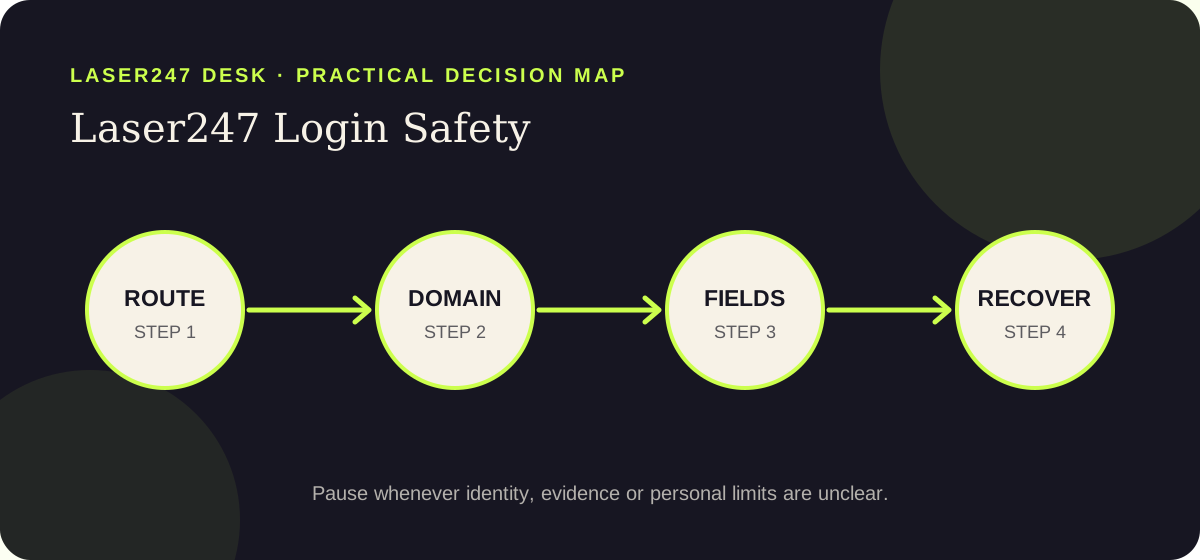
The order supports the goal of reaching an account page without exposing credentials. Starting with a page asking for a password, OTP or recovery payment lets another party control the route; starting with the task, source and limits keeps this Laser247 login safety decision reversible until the important questions are answered.
Open a bookmark or type an independently verified address. Do not let a new advert, QR code or chat message choose the credential destination. For this Laser247 login safety check, record what you inspected and which source supported it. If the answer depends only on a page asking for a password, OTP or recovery payment, mark it unresolved instead of filling the gap with confidence.
Inspect every label in the domain and notice redirects. A valid padlock encrypts a connection but does not establish who operates the page. For this Laser247 login safety check, record what you inspected and which source supported it. If the answer depends only on a page asking for a password, OTP or recovery payment, mark it unresolved instead of filling the gap with confidence.
A login should not need a UPI PIN, card PIN, recovery payment, screen-sharing session or remote-control installation. For this Laser247 login safety check, record what you inspected and which source supported it. If the answer depends only on a page asking for a password, OTP or recovery payment, mark it unresolved instead of filling the gap with confidence.
Let a password manager generate and bind a strong password to the intended hostname. Never recycle banking, email or social passwords. For this Laser247 login safety check, record what you inspected and which source supported it. If the answer depends only on a page asking for a password, OTP or recovery payment, mark it unresolved instead of filling the gap with confidence.
If access fails, close the page and locate the recovery route independently. Preserve alerts and change reused secrets from a trusted device. For this Laser247 login safety check, record what you inspected and which source supported it. If the answer depends only on a page asking for a password, OTP or recovery payment, mark it unresolved instead of filling the gap with confidence.
Decision table
A signal matters when it changes behaviour. For Laser247 login safety, the table avoids unsupported “safe” or “unsafe” labels and instead connects each observation about hostname, recovery route and credential handling to a proportionate next action.
| Signal | Why it matters | Safer response |
|---|---|---|
| Padlock certainty | HTTPS protects transport but can exist on a fraudulent domain. | Match the entire hostname to a route verified elsewhere. For Laser247 login safety, keep the next action proportionate to the possible exposure. |
| OTP disclosure | A code can authorise access or a transaction for the person who receives it. | Enter it only in the intended interface; never read it to a person. For Laser247 login safety, keep the next action proportionate to the possible exposure. |
| Recovery payment | A fee to unlock access converts a credential problem into financial exposure. | Stop and use an independently located recovery channel. For Laser247 login safety, keep the next action proportionate to the possible exposure. |
| Repeated password | One captured password can open unrelated accounts. | Use a unique password and change every reused copy after exposure. For Laser247 login safety, keep the next action proportionate to the possible exposure. |
Verification notes
For Laser247 login safety, record the exact question before opening another result or message. The working question is whether hostname, recovery route and credential handling can support the goal of reaching an account page without exposing credentials. Note the hostname, date, source and the claim in its original context. This small record prevents a later page from quietly changing the issue and makes “still unknown” a usable conclusion rather than an uncomfortable gap.
When two pages disagree about Laser247 login safety, do not count how many repeat each position. Ask which source is accountable, current, independent of a page asking for a password, OTP or recovery payment, and directly relevant to the fact being checked. Prefer a narrow supported statement over a broad reassuring one. If neither side meets that standard, retain both links, label the conflict unresolved and avoid any action that would expose credentials, identity, device access or money.
A no-action decision protects future choices. Write the stop reason in practical language: the identity was unclear, the terms could not be retained, the legal context needed advice, or the request exceeded the chosen limit. For this Laser247 login safety page, use this standing rule: Authenticate the destination before authenticating yourself. Recording the reason reduces the chance that a later countdown, different contact or newly designed page restarts the same decision without resolving the original problem.
Risks and common mistakes
For Laser247 login safety, mistakes often begin with a page asking for a password, OTP or recovery payment, a plausible explanation or one small exception—not deliberate recklessness. Naming those patterns before working toward this page’s goal—reaching an account page without exposing credentials—makes them easier to recognise under pressure.
HTTPS protects transport but can exist on a fraudulent domain. This matters when the practical task is reaching an account page without exposing credentials. The safer response is simple: match the entire hostname to a route verified elsewhere. A pause preserves choices; urgency usually removes them.
A code can authorise access or a transaction for the person who receives it. This matters when the practical task is reaching an account page without exposing credentials. The safer response is simple: enter it only in the intended interface; never read it to a person. A pause preserves choices; urgency usually removes them.
A fee to unlock access converts a credential problem into financial exposure. This matters when the practical task is reaching an account page without exposing credentials. The safer response is simple: stop and use an independently located recovery channel. A pause preserves choices; urgency usually removes them.
One captured password can open unrelated accounts. This matters when the practical task is reaching an account page without exposing credentials. The safer response is simple: use a unique password and change every reused copy after exposure. A pause preserves choices; urgency usually removes them.
Practical scenarios
These are decision exercises, not claims about Laser247 operations. Each applies the rule “authenticate the destination before authenticating yourself” while showing how a reader can preserve credentials, money, data or wellbeing without guessing the sender’s motive.
Situation: A password manager that normally recognises the site does not offer the credential.
Reasoned response for Laser247 login safety: The reader treats the mismatch as a warning, checks the hostname and does not paste the password manually. The useful result for a Laser247 reader is a controlled process, not a perfect prediction or a decision dictated by one unverified prompt.
Situation: A chat contact says the code is required to confirm ownership.
Reasoned response for Laser247 login safety: The user shares nothing, closes the conversation and uses a recovery route found independently. The useful result for a Laser247 reader is a controlled process, not a perfect prediction or a decision dictated by one unverified prompt.
Situation: The address changes after the Log in button is pressed.
Reasoned response for Laser247 login safety: The user records the destination, exits, and confirms whether that transition is documented by an accountable source. The useful result for a Laser247 reader is a controlled process, not a perfect prediction or a decision dictated by one unverified prompt.
Questions and answers
State the exact task and expected destination before acting. Then test hostname, recovery route and credential handling through a source that is independent of a page asking for a password, OTP or recovery payment. This prevents a broad brand search from becoming accidental consent, credential disclosure or payment. This editorial guide cannot make the decision safe by itself; it can only make the unresolved questions visible.
No. For Laser247 login safety, design, HTTPS, logos and search position can be useful technical or navigation signals, but none establishes operator identity on its own. Confirm the accountable party and exact hostname outside the page before relying on official-looking presentation. This editorial guide cannot make the decision safe by itself; it can only make the unresolved questions visible.
Keep the exact URL, relevant terms, recipient or publisher details, timestamps and the source used for verification. For Laser247 login safety, a contemporaneous record is more reliable than remembering a screen after it changes or disappears. This editorial guide cannot make the decision safe by itself; it can only make the unresolved questions visible.
Leave when pressure rises while identity, legality, terms or personal limits remain unclear. Also stop at any request for a password, OTP, UPI PIN, remote-control access or unexplained payment. Authenticate the destination before authenticating yourself. This editorial guide cannot make the decision safe by itself; it can only make the unresolved questions visible.
Related next steps
Keep the goal of reaching an account page without exposing credentials separate from later access, registration, payment or legal questions. If the task changes, open the matching guide and begin again with its evidence. Do not carry trust from a page asking for a password, OTP or recovery payment into another domain, person or decision without verification.
This editorial guide is for adults 18+. Gambling can cause financial and personal harm; no result is guaranteed.
Do not participate if underage or ineligible where you live.
Fix affordable money and time limits before play, then stop when either is reached.
Do not borrow, increase stakes or continue to recover earlier losses.
Never share a password, OTP, UPI PIN, card PIN or screen-control access.
Review your jurisdiction; use the support and stopping guide when play causes concern.